Demonstrations
Home > Support > FAQ: Implementation in Graphic Arts Schools
FAQ: Implementation in Graphic Arts Schools


Introduction

- worldskill
Over 1700 printing Sinapse simulators are installed worldwide by education and industry users
Over 220 (around 40%) of world’s print schools use simulators in their training programs
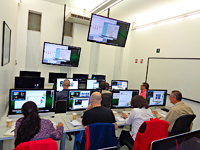
Some schools have a single simulator, while others use 30+
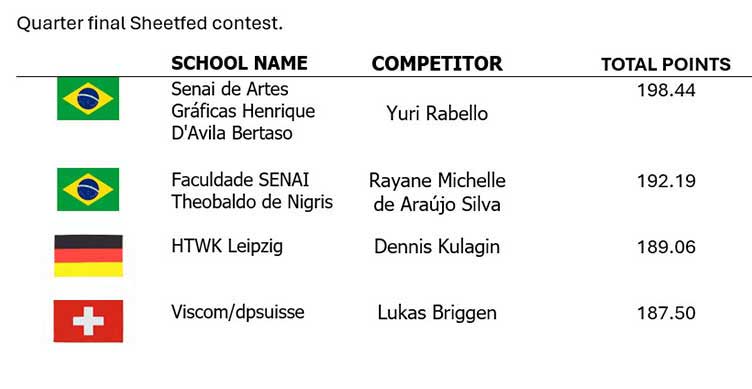
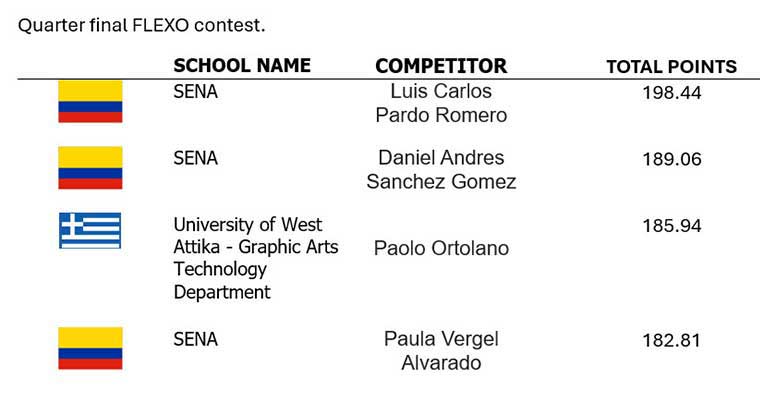
Simulators are universally recognized as training and evaluation tools and are used in the WorldSkills Competition, of which Sinapse is a sponsor.
Contents
 Key benefits of Simulators for Print Training Schools We already have a training press — do we need a simulator too? Can Simulators Replace Presses? Do Simulators Accelerate Learning? How can simulators provide a stimulating learning experience? Why are simulators good at developing problem-solving skills? What about improving quality control skills and use of tools? How can we evaluate the student’s progress ? What about curriculums? What comes with the Simulator? How to motivate students to use the simulator? What about Cross Training & Different Skill Levels? Can we integrate the simulator with other courses? What about using simulators in universities? Is there a network version? How about Distance Learning and Outreach? What about Simulator Hardware : computer and monitor(s) How many students per simulator? What are the cost justifications to invest in simulators? What are the Comparative Costs? Summary Why Use a Print Simulator? Presentations on the use of print simulators by schools
Key benefits of Simulators for Print Training Schools
1. Stimulates learning experience
2. Increases effectiveness of print teaching
3. Increases traceability of learning for students and their teachers
4. Substitutes or complements the use of press ‘hardware’
5. Lowers the costs of teaching printing
We already have a training press — do we need a simulator too?
Yes: Simulators increase overall learning efficiency, with a better process understanding and develops problem skills more rapidly.
- Simulation exercises reinforce printing “experience” without c*onstraints of cost or press availability.
- Reduces press operating hours per student for same/higher training outcome and thereby increases capacity to train more people on a press
- Simulation is the intermediate step between a theoretical lesson and real application.
- In many cases simulators allow training in areas and scenarios that are not possible with real presses
- Real presses cannot be used for distance learning/remote supervision
- Less press operating hours/cost per student from reduced consumption of energy, paper, ink, other consumables, parts and maintenance
- Extends useful life of an existing training press and eliminates need to invest in new press technology hardware. A “simple” press with non-automated controls provide students with a clearer understanding of what is behind a push button of new technologies. Control console technology is extremely well replicated on the simulator and can be updated at a fraction of the price for a press.
- Simulators can have a generic press interface, or in some cases the interface from a specific press manufacturer, Sheetfed press interfaces of MAN or Heidelberg type, Heatset interfaces of Goss or MAN type, …
Can Simulators Replace Presses?
Yes: Schools unable to purchase a press have found simulation is a very good alternative. Many schools provide multi process press training (sheetfed, flexo, heatset, etc) without a single ‘hard’ press.
But: At some point a minimum “hands-on” work on a press is needed to experience physical handling of plates and ink, setting rollers and fitting blankets, running up to color, control of ink/water balance, etc. Many schools organize this “hands-on” work with industry.
Do Simulators Accelerate Learning?
Yes: Simulators increase familiarization and confidence of press operation.
- Easy demonstration of the consequences of bad decisions and poor practices without the risk of accidents or damage.
- Problem solving skills can be more highly developed on a simulator rather than just on a press.
- Many printing problems occur only rarely on a real press but can be created easily on a simulator.
- It is simple and easy to reproduce single or multiple printing and press problems on demand.
- Tasks can be repeated until familiar with problem, analysis and solutions
- Learning by trial and error is much quicker with a simulator
How can simulators provide a stimulating learning experience?
Simulators make training more interesting and therefore more effective:
- ’Digital Native’ generation likes to work with computers. The “fun” element is motivating for students.
- Young students enjoy learning especially when they are unaware of the “work” they are doing. They can “play” by pushing press performance to the limits and provoke accidents that can never be allowed on a real press.
- Training can include informal competitions and recognition of ‘winners’ (the association of a “game” with an analysis is not possible on a real press).
Why are simulators good at developing problem-solving skills?
Experienced press operators learn to solve problems as they occur over long periods of time. Teaching problem solving on a real press is difficult because of the high costs of staging many problems and their unpredictability.
Simulators have no such limitations and allow faster learning of broader problem solving skills. It is a tool that allows students to “see” what is not working and to analyse their errors in order to develop the right reflex at the right moment.
An example:
Set a problem on the press
Show the students the results
Set the same problem on the simulator
Let the students make their mistakes and find the best solution – no cost.
Have them explain their solution in terms of the printing process
Go back and solve the problem on the press
Check the cost of correction (on screen) as every action (or inaction) has a cost
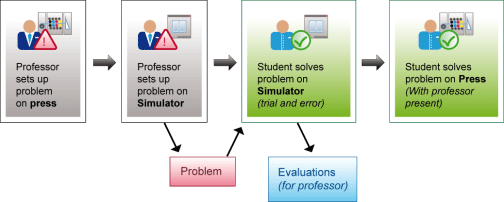
- Simulators allow students to try different ways to solve a problem without the stress of a real situation.
What about improving quality control skills and use of tools?
Simulators encourage systematic use of built-in quality control tools — including spectrophotometer, densitometer, gloss meter & magnifier.
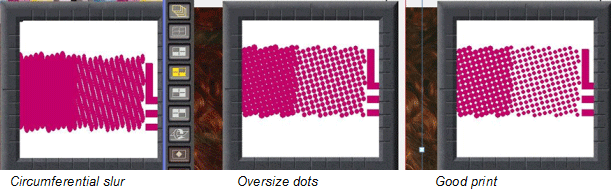
For example: above we see (left to right): “circumferential slur” (blanket packing too thick), “dot gain” (plate/blanket pressure too high), and “correct dot size (no problem). Both the Slur and the Gain make the magenta look too high: but the densitometer will show that the density is correct! Thus the student can make the right choice on how to solve the problem – because they know how to use the information from the control tools.
How can we evaluate the student’s progress ?
The simulators come with a Administrator tool called the Educational Server (ES).
This Educational Server is a web-based learning management system that proposes simulator lessons to the student, and makes the results available to the instructor. This system increases the amount of useful knowledge for the trainer while reducing their administration time. Key benefits include:
- Create and compare ‘benchmark’ reports for individual trainees, groups, and sites.
- Identify who is having problems and needs more coaching.
- Individual analysis allows the instructor to review a student’s progress and problems, with an automatic comparison of a student solution with a “recommended solution”.
The Educational Server centralizes information for the training environment with simulator exercises, print jobs, and multimedia links accessible from any workstation.
Automatic Session Analysis (ASA): Compares the trainee’s session to a “reference solution”, and shows the results in different ways. The Green, Orange and Red lights indicate whether the trainee results were within ‘n’ % of the reference, and the detailed comparisons help highlight the problem areas.
User Reports Centralize and Compare results
These show the results for each trainee and exercise. These are shown compared to other trainees, production sites, and to the “reference solution”. This report gives the trainer and administrators an overview of the use of the simulator and the problems and progress of individuals and groups.
More ‘objective” environment for evaluation – same for everyone and can be tied into “certification” procedures. Provides basis of standardized, equal and repeatable evaluation. Independent of material, climatic and other variables, free of influence from interpersonal relations, or subjective methods.
A simulator is a component of a complete training program for each competence level. Typically it is associated with a curriculum from an education institution such as PIA/GATF, NAA, FTA, GAA that combines three aspects :
1: Classroom training
2: Simulator exercises
3: Hands on training (at school or print company)
What comes with the Simulator?
Simulators act as a “practice press” and each is supplied with:
- A full set of student and administrator workbooks (cross-referenced to PIA Sheetfed Training Program)
- Student workbook to learn press and simulator
- Problem scenarios to get used to press settings, quality control tools, and problem solving
- Some simulators also include additional scenarios to for more sophisticated problem solving; and administrator versions showing both problems and solutions.
Each school decides how to integrate this material to suit their training needs
A full set of student and administrator workbooks comes with the simulators, problems and solutions
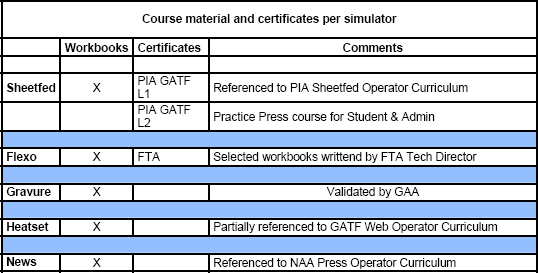
Workbook contents (example from SHOTS)
- 3 study units introduce the SHOTS simulator and the sheetfed process.
- 3 study units with 50 pre-set exercises addressing the items in the previous units.
- Administrators’ solution documents for workbooks and pre-set exercises.
Practice Press Contents
- 140 exercises following the principles of the GATF Sheetfed Offset Press Training Program.
- Administrators’ solution documents for practice press pre-set exercises.
The Sinapse Users Club facilitates the exchange of training exercises with other schools
How to motivate students to use the simulator?
Give each student their copy of the workbook to follow and fill out. This takes them through the following steps:
1. Introduction: Make sure students succeed from the beginning. It generally takes 3 to 5 sessions for students to become comfortable with moving around the virtual pressroom. Start with short 20-30 minutes sessions.
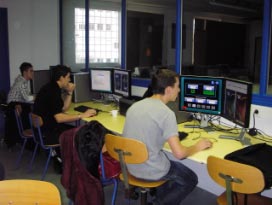 2. Begin with simple problems to solve, e.g. "too much magenta", "ink stroke too high", "cyan out of register", "magenta high", "yellow and black out of register.
3. Progressively introduce quality control tools: Densitometer, gloss meter, etc.
4. Competitions make the sessions more fun, e.g. who can solve problems at the lowest production cost. (Competition problems from past contests and WorldSkills competitions are included with documentation) Left: French students during the first SHOTS contest.
After users become comfortable what next?
5. Intermediate level: Sessions become longer, between 40 to 75 minutes.
6. Comparatively simple sets of multiple problems of the same type, e.g. Printing: Color and register; Mechanical: Blanket packing; Materials handling: Tension and folder (web) or feeder/delivery (sheetfed); Chemistry issues.
7. Trouble shooting using QC (quality control tools e.g. densitometer). The tools help to solve problems more quickly at lower cost (most users report a sharp increase in use of QC tools after simulator training).
Many of these steps are included in the “practice press” exercises – in particular for the Sheetfed Simulator.
All exercises should be reviewed by the trainer to ensure that certain skills have been learned and retained, e.g. the trainee should be able to differentiate between density and pressure problems.
What about Cross Training & Different Skill Levels?
- Simulators can be used by management trainees and graphic arts design students to provide them with better awareness of the printing process.
- Excellent for training people entering the job market.
- Excellent for retraining people changing their skills.
- Good predictor of ability to adapt to new technology,
- Excellent predictor of problem-solving and communication skills in the pressroom
- Simulators can be used to cross-train and raise print awareness of prepress, postpress, customer and sales staff.
Can we integrate the simulator with other courses?
Yes: Existing course material that is readable on a computer can be integrated into the simulator.
Put in your own images. Involve design students to integrate Multi Media on How & Why
Ex: Video of “How” for procedures, Clip in existing course material Make the simulator the “graphic interface” for other material (click on the dampening system and get a course on lithographic principles, or videos of “How To”)
Build problems from prepress/bindery, etc. for many of these: just take them from the workbooks
Teach the Economics of Print
Change costs and times, compare results show students the economic consequences of their actions
Other programs can be called from within the simulator environment
What about using simulators in universities?
Universities, polytechnics and technical high schools use simulators at different levels of intensity to provide time and cost effective tuition in areas that include:
- Providing students with a hands-on practical understanding of multiple printing processes.
- Issues related with press construction, operation, process and quality control, maintenance
- Stimulation of discussions on supply chains, materials, quality control, SPC, role of training in production environment, etc.
- Offers management students the possibility to learn how processes can be optimized and the impact on costs from multiple variables — the simulators costing feature is a valuable tool for this.
Stuttgart HdM reports the combination of ‘”fun and learning” has doubled enrolment for the subject. Grades in press-related exams have improved since the introduction of the simulator. Other universities using Sinapse simulators include Clemson, Ryerson, and Wisconsin Stout in North America; Helsinki, Grenoble and Stuttgart in Europe; RMIT and BICG in Asia.
Yes: A network license server permits installation on all computers,
and allows “n” simultaneous users. The number of “active seats” are related to the number of licenses. For example, it is possible to install the simulator on 40 computers (e.g. 2 or 3 classrooms) and run only 10 at once (depending on active licenses).
The educational server enables a trainee to sign on at any workstation, while the results will be centralized for the instructor.
How about Distance Learning and Outreach?
Yes: On-line training — tomorrow’s training room
- Allows educators to act as trainers for smaller companies who have purchased their own simulator. Internet technology lets trainers “look over their shoulders” of student for tutoring, and to review results. The instructor verifies the results and helps the trainees asynchronously or in real-time.
- Remote trainees in external companies can use the simulator and its related training environment. They use the same workbooks and have the same proof of training and possibility of Training Certificates.
- Companies can organize their training in off-peak times. The company runs the simulator on site (they need their own license)
- Significant reduction of travel time and costs.
What about Simulator Hardware : computer and monitor(s)
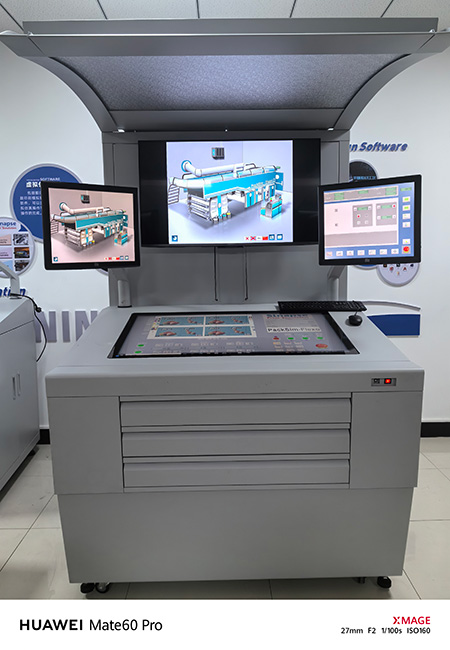
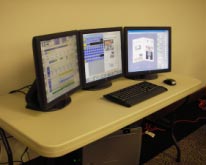 All simulator models (flexo, sheetfed, newspaper, etc) can be installed on a single computer with adequate capacity
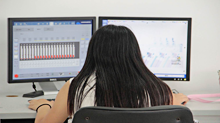
2 display screens is much better than 1
3 screens recommended for Offset simulators (so can see plates as well)
University of West Virginia has installed its newspaper simulator on 3 screens.
What about running the simulator on Apple platforms?
Sinapse simulators have been developed for Windows industrial environments that is used by most press operating systems. Under certain circumstances they can be run on an Apple platform using Windows emulation. However, there are compatibility issues, running on multiple screens is not satisfactory, and Sinapse cannot warrant current performance or future compatibility.
How many students per simulator?
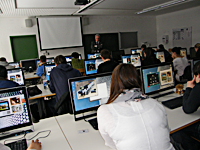
Experience shows that 2 is a practical maximum, and often better than 1: 10 students per class + 1 instructor = 6 simulators 20 students per class + 1 instructor = 11 simulators
Generally schools start with 1-3 simulators to get used to using them in the curriculum then come back for more as necessary
What are the cost justifications to invest in simulators?
Direct and indirect costs associated with a real press are substantial and include:
- Purchase costs: Requires access to finance new press hardware that can cost millions. New presses theoretically need to operate 16-24 hours a day — conditions difficult to achieve in training.
- Running costs: Press requires significant floor space, spares, maintenance, insurance, etc.
- Operating costs: Paper, ink, other consumables.
- Setup/Clean-up: 50% of press time is not used for actual production.
In contrast, simulators have very low capital and operating costs, use no consumables, and have low risk of accident, injuries and damage.
What are the Comparative Costs?
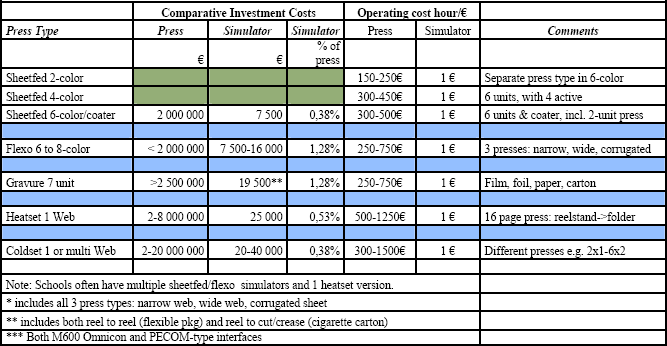
Summary Why Use a Print Simulator?
- The Digital Generation likes to work and play with computers
- Learning by doing and by making mistakes is easy and inexpensive on a simulator
- Allows different ways to solve a problem to be tried without the stress of a real situation
- Develops a common approach to problem solving
- Active learning has the highest retention rate of all learning methods
- Structured, progressive, repeatable, documented
- Objective criteria & method for evaluation — get baselines, set training goals, evaluate progress
- More efficient and cost effective
- Accelerated learning
- Easy for Instructor to follow progress and compare results
Click here to see a list of educational institutions currently using simulators
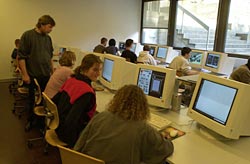 Over hundreds of schools and training centers use Sinapse print simulators all over the world. We suggest that you have a look at this short presentation prepared by Mrs Eva Paap from HdM Stuttgart, one of the major German Graphic Arts Schools. In this she explains how the school integrated the sheetfed and heatset simulators in its curriculum. The Hdm currently has 4 sheetfed and 2 web heatset simulators.


HdM Stuttgart presentation
Why and How do simulators fit in a training program? Find more details in this presentation done by Sinapse during the GATF Teacher’s Conference in October 2008.
GATF Teacher’s Conference October 2008